


6. API 接口说明及使用
字库初始化成功后,即可调用 API 接口读取各国文字的点阵或矢量数据。本章按点阵字库 API、矢量字库 API、转码表函数三部分说明。
6.1 点阵字库 API 接口
注意:中文使用 GB2312、GBK、GB18030 编码,日文使用 JIS0208 编码,韩文使用 KSC5601 编码,其他国家都是 Unicode 编码。上述语言的编码可以使用字符集字符编码页集合来查找(见第 5 章 编码查询)。
6.1.1 字体选择
点阵字体由 font_option 参数选择。本示例提供的字体选项如下,客户自己的字体预定义可去生成的 gt_gui_driver.h 头文件中查找。
| 宏定义 | 值 | 说明 |
|---|---|---|
GT_FAMILY_GB2312_16_ST | 3 | 中文 GB2312,16 点阵 |
GT_FAMILY_ASCII_8x16 | 30 | ASCII,8x16 |
GT_FAMILY_ASCII_16x16_T | 38 | ASCII,16x16 |
GT_FAMILY_JIS0208_16 | 44 | 日文 JIS0208,16 点阵 |
GT_FAMILY_KSC5601_16 | 47 | 韩文 KSC5601,16 点阵 |
GT_FAMILY_Latin_8x16 | 50 | 拉丁文,8x16 |
GT_FAMILY_Latin_16x16_A | 52 | 拉丁文,16x16 |
GT_FAMILY_Cyrillic_8x16 | 57 | 西里尔文,8x16 |
GT_FAMILY_Cyrillic_16x16_A | 59 | 西里尔文,16x16 |
GT_FAMILY_Greek_8x16 | 64 | 希腊文,8x16 |
GT_FAMILY_Greek_16x16_A | 66 | 希腊文,16x16 |
GT_FAMILY_Hebrew_8x16 | 71 | 希伯来文,8x16 |
GT_FAMILY_Arabic_16x16 | 74 | 阿拉伯文,16x16 |
GT_FAMILY_Thai_32x32 | 77 | 泰文,32x32 |
GT_FAMILY_Thai_48x48 | 78 | 泰文,48x48 |
GT_FAMILY_Hindi_16x24 | 79 | 印地文,16x24 |
6.1.2 ASCII 的 API 调用
该函数使用的是 Unicode 编码调用 ASCII 字符。获取到的字符数据会存储到用户定义的数组中。
/**
* @brief 读取英文的点阵数据
* @param fontcode 英文编码
* @param font_option 字体选择
* @param pbuffer 存储读取出的点阵数据
* @retval 读取的数据个数
*/
int GT_GetASCII(unsigned long fontcode, unsigned int font_option, unsigned char* pbuffer);
使用示例:
memset(DZ_Data, 0, sizeof(DZ_Data));
GT_GetASCII(0x41, GT_FAMILY_ASCII_8x16, DZ_Data);
6.1.3 中文的 API 调用
使用中文 API 前,可在 GT-HMI Designer2 的「字库芯片 → 编码查询」中查询中文的 GB2312、GBK 及 GB18030 编码(图 3-1)。
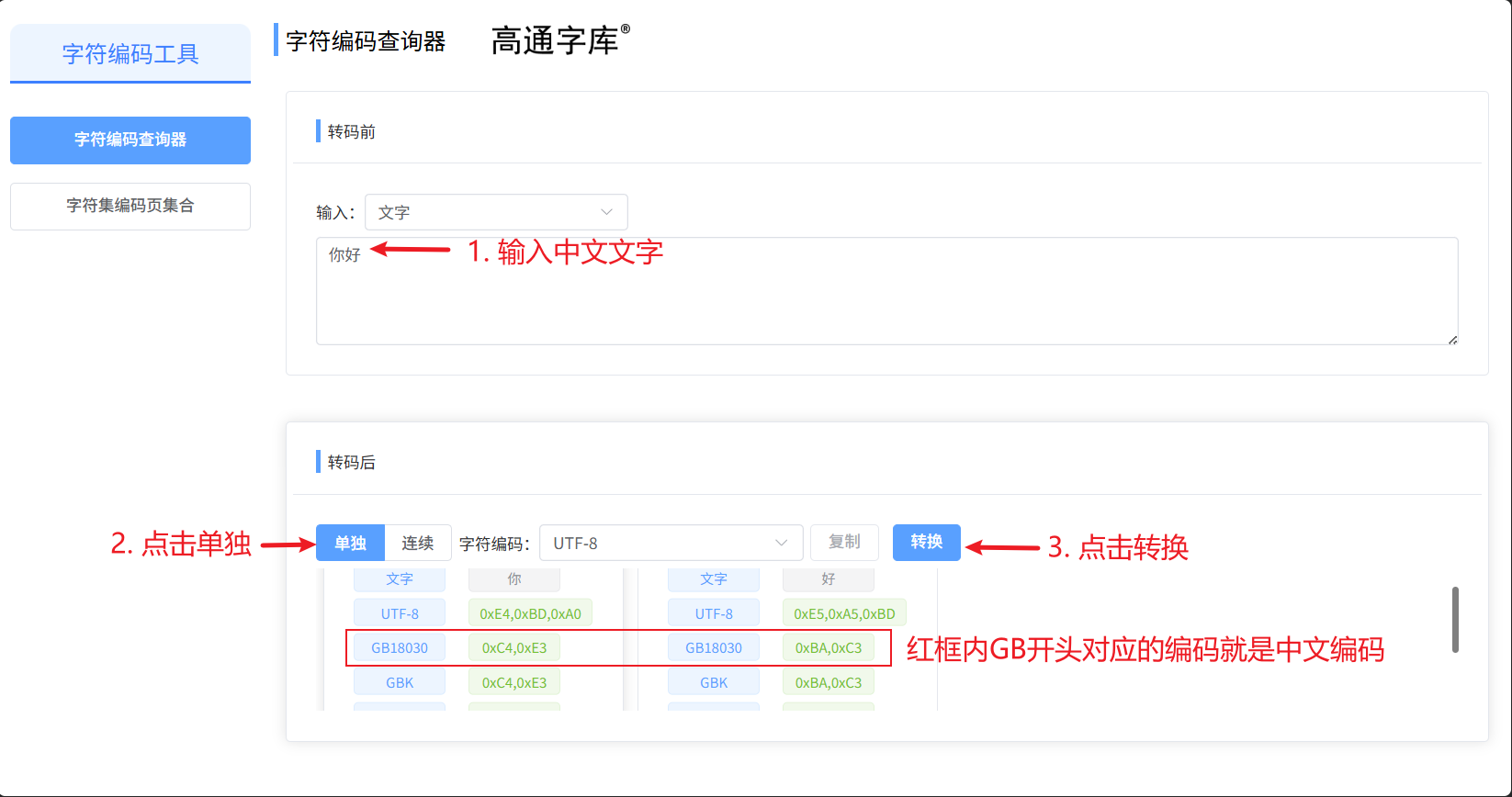
以下为具体的中文 API 函数,fontcode 参数传入完整的中文编码值。
/**
* @brief 读取中文的点阵数据
* @param fontcode 中文编码
* @param font_option 字体选择
* @param pbuffer 存储读取出的点阵数据
* @retval 读取的数据个数
*/
int GT_GetChinese(unsigned long fontcode, unsigned int font_option, unsigned char* pbuffer);
使用示例:
// 当中文、日文、韩文输入分别采用GBK、JIS0208、KSC5601编码时,
// 调用前设为1,读取结束后恢复为0(Unicode模式)。
GT_Set_Chinese_Charset_Type(1);
GT_GetChinese(0xD6D0, GT_FAMILY_GB2312_16_ST, DZ_Data);
GT_Set_Chinese_Charset_Type(0);
6.1.4 拉丁文的 API 调用
使用拉丁文 API 函数前,可在 GT-HMI Designer2 的「字库芯片 → 编码查询」中查询拉丁文的 Unicode 编码。按照图 3-2 中的顺序操作即可。
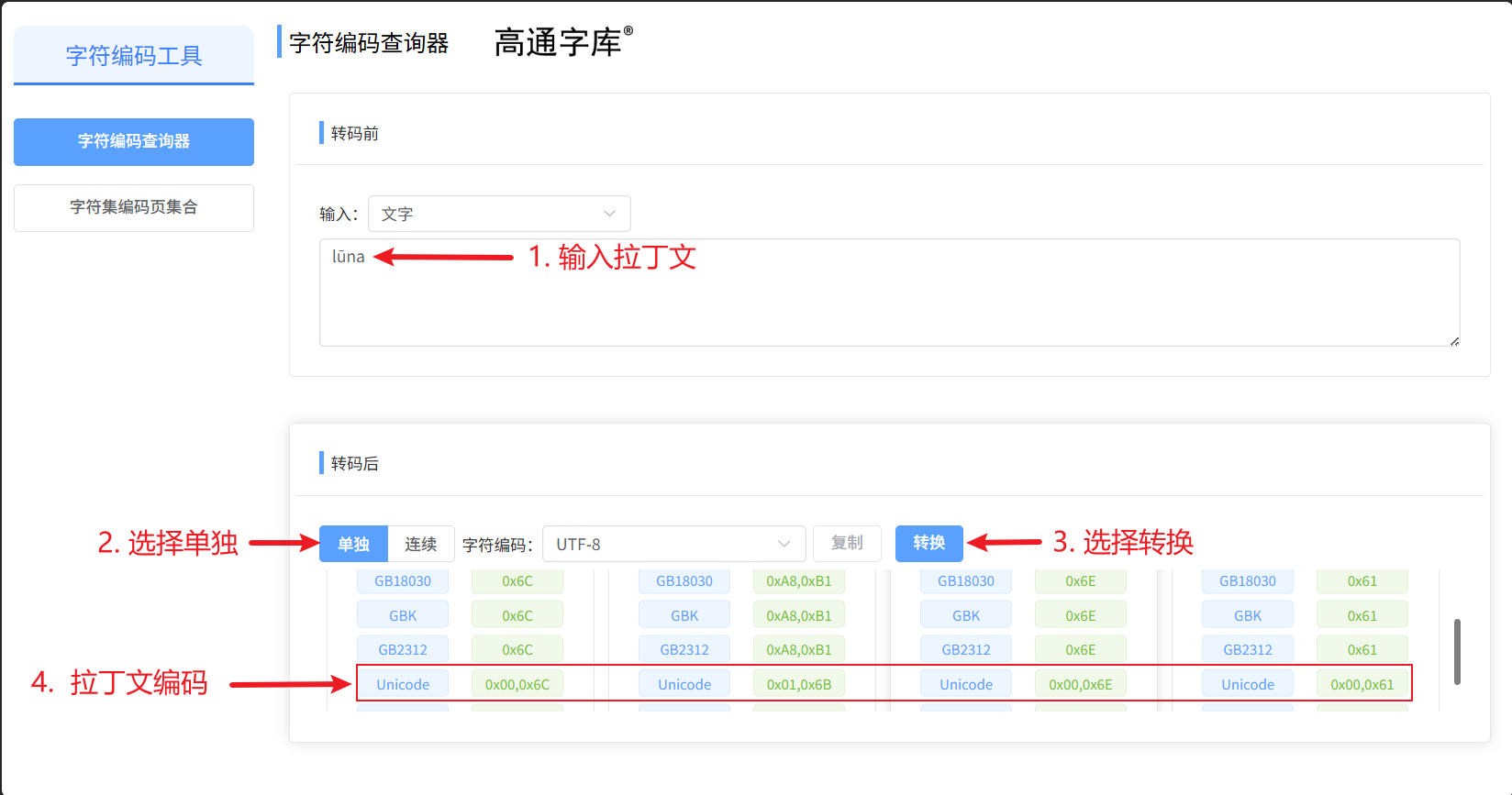
拉丁文包括大多数的欧美国家语言,例如:英语、法语、德语、西班牙语、葡萄牙语、荷兰语等。该函数使用的是 Unicode 编码调用文字。如果要用到希腊语或者东欧国家的文字,需要调用其他的 API 接口。此处调用的是拉丁文 8x16 字号大小,其他字号的调用方式同理。
/**
* @brief 读取拉丁文的点阵数据
* @param fontcode 拉丁文编码
* @param font_option 字体选择
* @param pbuffer 存储读取出的点阵数据
* @retval 读取的数据个数
*/
int GT_GetLatin(unsigned long fontcode, unsigned int font_option, unsigned char* pbuffer);
使用示例:
GT_GetLatin(latin_buf[i], GT_FAMILY_Latin_8x16, DZ_Data);
6.1.5 西里尔文的 API 调用
西里尔文包括部分东欧国家语言,例如俄罗斯、塞尔维亚、乌克兰、蒙古等国家语言。该函数使用的是 Unicode 编码调用文字。西里尔文的编码查询参考第 5 章「编码查询」,获取 Unicode 编码。此处调用的是西里尔文 8x16 字号大小,其他字号的调用方式同理。
/**
* @brief 读取西里尔文的点阵数据
* @param fontcode 西里尔文编码
* @param font_option 字体选择
* @param pbuffer 存储读取出的点阵数据
* @retval 读取的数据个数
*/
int GT_GetCyrillic(unsigned long fontcode, unsigned int font_option, unsigned char* pbuffer);
使用示例:
GT_GetCyrillic(cyrillic_buf[i], GT_FAMILY_Cyrillic_8x16, DZ_Data);
6.1.6 希腊文的 API 调用
希腊文适用于希腊。该函数使用的是 Unicode 编码调用文字。希腊文的编码查询参考第 5 章「编码查询」,获取 Unicode 编码。此处调用的是 8x16 字号大小的希腊文,其他字号大小调用方式同理。
/**
* @brief 读取希腊文的点阵数据
* @param fontcode 希腊文编码
* @param font_option 字体选择
* @param pbuffer 存储读取出的点阵数据
* @retval 读取的数据个数
*/
int GT_GetGreek(unsigned long fontcode, unsigned int font_option, unsigned char* pbuffer);
使用示例:
GT_GetGreek(greek_buf[i], GT_FAMILY_Greek_16x16_A, DZ_Data);
6.1.7 希伯来的 API 调用
希伯来文适用于部分中东国家,如以色列。该函数使用的是 Unicode 编码调用文字。希伯来文的编码查询参考第 5 章「编码查询」,获取 Unicode 编码。此处调用的是 8x16 字号大小的希伯来文,其他字号大小调用方式同理。
/**
* @brief 读取希伯来文的点阵数据
* @param fontcode 希伯来文编码
* @param font_option 字体选择
* @param pbuffer 存储读取出的点阵数据
* @retval 读取的数据个数
*/
int GT_GetHebrew(unsigned long fontcode, unsigned int font_option, unsigned char* pbuffer);
使用示例:
GT_GetHebrew(hebrew_buf[i], GT_FAMILY_Hebrew_8x16, DZ_Data);
6.1.8 日文的 API 调用
该函数使用的是 JIS0208 编码调用文字。日文的编码可以通过下方链接查询对应的 JIS0208 编码:
https://download.gaotongfont.cn/GT_Font_Chip/Encoding_table/JISx0208.pdf
此处调用的是 16x16 字号大小的日文,其他字号大小调用方式同理。注意 JIS0208 编码进制为 10 进制。
/**
* @brief 读取日文的点阵数据
* @param fontcode 日文编码
* @param font_option 字体选择
* @param pbuffer 存储读取出的点阵数据
* @retval 读取的数据个数
*/
int GT_GetJapanese(unsigned long fontcode, unsigned int font_option, unsigned char* pbuffer);
使用示例:
GT_Set_Chinese_Charset_Type(1);
GT_GetJapanese(jis_buf[i], GT_FAMILY_JIS0208_16, DZ_Data);
GT_Set_Chinese_Charset_Type(0);
6.1.9 韩文的 API 调用
该函数使用的是 KSC 编码调用文字。韩文的编码可以通过下方链接查询对应的 KSC5601 编码:
https://download.gaotongfont.cn/GT_Font_Chip/Encoding_table/KSC5601.pdf
此处调用的是 16x16 字号大小的韩文,其他字号大小调用方式同理。
/**
* @brief 读取韩文的点阵数据
* @param fontcode 韩文编码
* @param font_option 字体选择
* @param pbuffer 存储读取出的点阵数据
* @retval 读取的数据个数
*/
int GT_GetKorean(unsigned long fontcode, unsigned int font_option, unsigned char* pbuffer);
使用示例:
GT_Set_Chinese_Charset_Type(1);
GT_GetKorean(ksc_buf[i], GT_FAMILY_KSC5601_16, DZ_Data);
GT_Set_Chinese_Charset_Type(0);
6.1.10 泰文的 API 调用
该函数使用的是 Unicode 编码调用泰文文字。泰文的编码查询参考第 5 章「编码查询」,获取 Unicode 编码。字库提供 GT_FAMILY_Thai_32x32 和 GT_FAMILY_Thai_48x48 两种字号(见 6.1 字族表),本节示例以 32x32 为例。如果只是显示单个的泰文字符,直接调用 GT_GetThai 即可;如果要显示泰文的句子,则要使用泰文的组合算法。具体代码如下:
/**
* @brief 读取泰文的点阵数据
* @param fontcode 泰文编码
* @param font_option 字体选择
* @param pbuffer 存储读取出的点阵数据
* @retval 读取的数据个数
*/
int GT_GetThai(unsigned long fontcode, unsigned int font_option, unsigned char* pbuffer);
组合显示原理:泰文是不等宽文字,点阵数据在字库中按固定大小的方块(如 32x32)存储。组合显示时,先由 GT_Font_Code_Transform 获取字符数据并转换排列方式,GT_Get_Font_Convertor_Data 按泰文语言规则将声调、元音等符号组合到基字符上;每显示一个字符,再用 gt_font_get_word_width_figure_up 测出方块内字符的实际占用宽度(去掉两侧空白),并以该实际宽度作为下一个字符的步进,从而拼出紧凑、正确的泰文句子。目前组合算法基于 32x32 字号实现。
使用示例:
/********************泰文 start*****************************/
// 常用泰文的有:泰语、老挝语等
memset(DZ_Data, 0, sizeof(DZ_Data));

// 配置调用结构体
font_convertor_st thai_convertor = {
    .fontcode = thai_buf,
    .code_len = sizeof(thai_buf)/sizeof(thai_buf[0]),
    .fontsize = 32,
    .fontgray = 1,  // 点阵默认灰度为1
    .font_option = GT_FAMILY_Thai_32x32,
    .thick = 32,
    .data_p = DZ_Data,
    .data_len = sizeof(DZ_Data),
    .is_rev = 0,
    .is_vec = 0,
#if _GT_USE_MODE_ONLY_FONT_LIB
    .read_dot_font = _thai_read_dot_font_cb,
#else
    .read_dot_font = GT_GetThai,
#endif //_GT_USE_MODE_ONLY_FONT_LIB
};

// 获取字符数据,并转换排列方式,方便后续组合
int thai_text_len = GT_Font_Code_Transform(&thai_convertor);
int thai_tmp = 0;
int thai_font_wigth = 0;
for(int i = 0; i < thai_text_len;)
{
    memset(DZ_Data, 0, sizeof(DZ_Data));
    thai_tmp = 0;
    thai_font_wigth = 0;
    // 根据语言规则组合字符
    thai_tmp = GT_Get_Font_Convertor_Data(&thai_convertor, i);
    // 计算字符宽度
    thai_font_wigth = gt_font_get_word_width_figure_up(&thai_convertor.data_p[0], 32, 32, thai_convertor.fontgray);
    // 显示字符
    fontDisplay_DZ(thai_convertor.data_p, x, y, 32, 32, 0x0000, 0xFFFF, 0);
    x += thai_font_wigth;
    i += thai_tmp;
}
/********************泰文 end*****************************/
6.1.11 阿拉伯文的 API 调用
该函数使用的是 Unicode 编码调用阿拉伯文文字。阿拉伯文的编码查询参考第 5 章「编码查询」,获取 Unicode 编码。此处调用的是 16x16 字号大小的阿拉伯文。如果只是显示单个的阿拉伯字符,可以直接调用 GT_GetArabic;如果要显示阿拉伯句子,则需要阿拉伯组合算法,具体的使用示例如下:
/**
* @brief 读取阿拉伯文的点阵数据
* @param fontcode 阿拉伯文编码
* @param font_option 字体选择
* @param pbuffer 存储读取出的点阵数据
* @retval 读取的数据个数
*/
int GT_GetArabic(unsigned long fontcode, unsigned int font_option, unsigned char* pbuffer);
使用示例:
uint16_t arabic_buf[] = {0x0627, 0x0644, 0x0639, 0x0631, 0x0628, 0x064A, 0x0629};
font_convertor_st arabic_convertor = {
    .fontcode = arabic_buf,
    .code_len = sizeof(arabic_buf) / sizeof(arabic_buf[0]),
    .fontsize = 16,
    .fontgray = 1,                    // 点阵灰度固定为1
    .font_option = GT_FAMILY_Arabic_16x16,
    .thick = 16,
    .data_p = DZ_Data,
    .data_len = sizeof(DZ_Data),
    .is_rev = 1,                     // 阿拉伯文从右向左书写
    .is_vec = 0,
    .read_dot_font = GT_GetArabic
};
int text_len = GT_Font_Code_Transform(&arabic_convertor);
for (int i = 0; i < text_len;) {
    memset(DZ_Data, 0, sizeof(DZ_Data));
    int used = GT_Get_Font_Convertor_Data(&arabic_convertor, i);
    int width = gt_font_get_word_width_figure_up(
        arabic_convertor.data_p, 16, 16, arabic_convertor.fontgray);
    fontDisplay_DZ(arabic_convertor.data_p, x, y, 16, 16,
        0x0000, 0xFFFF, 0);
    x += width;
    i += used;
}
6.1.12 印地文的 API 调用
该函数使用的是 Unicode 编码调用印地文文字。印地文的编码查询参考第 5 章「编码查询」,获取 Unicode 编码。此处调用的是 16x24 字号大小的印地文。如果只是显示单个的印地文字符,可以直接调用 GT_GetHindi;如果要显示印地文句子,则需要使用组合算法,具体的使用示例如下:
/**
* @brief 读取印地文的点阵数据
* @param fontcode 印地文编码
* @param font_option 字体选择
* @param pbuffer 存储读取出的点阵数据
* @retval 读取的数据个数
*/
int GT_GetHindi(unsigned long fontcode, unsigned int font_option, unsigned char* pbuffer);
使用示例:
/************************印地文 start******************************/
// 常用的印地文有:印地语、梵语、尼泊尔语等
memset(DZ_Data, 0, sizeof(DZ_Data));

// 配置调用结构体
font_convertor_st hindi_convertor = {
    .fontcode = hindi_buf,
    .code_len = sizeof(hindi_buf)/sizeof(hindi_buf[0]),
    .fontsize = 24,
    .fontgray = 1,  // 点阵灰度默认为1
    .font_option = GT_FAMILY_Hindi_16x24,
    .thick = 24,
    .data_p = DZ_Data,
    .data_len = sizeof(DZ_Data),
    .is_rev = 0,    // 印地文从左向右书写;is_rev 目前仅阿拉伯文组合使用,其他语言置 0。
    .is_vec = 0,
#if _GT_USE_MODE_ONLY_FONT_LIB
    .read_dot_font = _hindi_read_dot_font_cb,
#else
    .read_dot_font = GT_GetHindi,
#endif //_GT_USE_MODE_ONLY_FONT_LIB
};

// 获取字符数据,并转换排列方式
int hindi_text_len = GT_Font_Code_Transform(&hindi_convertor);
int hindi_font_wigth = 0;
int font_data_len = (16 / 8) * 24; // 单字符数据长度 = (宽 / 8(bit)) * 高
for(int i = 0; i < hindi_text_len; i++)
{
    hindi_font_wigth = 0;
    // 计算字符宽度
    hindi_font_wigth = gt_font_get_word_width_figure_up(&hindi_convertor.data_p[i * font_data_len], 16, 24, hindi_convertor.fontgray);
    // 显示字符
    fontDisplay_DZ(&hindi_convertor.data_p[i * font_data_len], x, y, 16, 24, 0x0000, 0xFFFF, 0);
    x += hindi_font_wigth;
}
/***************************印地文 end******************************/
6.1.13 高棉文的 API 调用
该函数使用的是 Unicode 编码调用高棉文文字。高棉文的编码查询参考第 5 章「编码查询」,获取 Unicode 编码。此处调用的是 32x32 字号大小的高棉文,其他字号大小调用方式同理。
/**
* @brief 读取高棉文的点阵数据
* @param fontcode 高棉文编码
* @param font_option 字体选择
* @param pbuffer 存储读取出的点阵数据
* @retval 读取的数据个数
*/
int GT_GetKhmer(unsigned long fontcode, unsigned int font_option, unsigned char* pbuffer);
使用示例:
// 高棉文「你好世界」示例,Unicode 码点如下
unsigned short khmer_buf[] = {
    0x179F, 0x17BD, 0x179F, 0x17D2, 0x178F, 0x17B8, 0x0020,
    0x1796, 0x17B7, 0x1797, 0x1796, 0x179B, 0x17C4, 0x1780,
};

// Khmer 回调(_GT_USE_MODE_ONLY_FONT_LIB 模式下使用)
static int _khmer_read_dot_font_cb(_gt_read_cb_param_st* read_cb){
    if(!read_cb || !read_cb->convert || !read_cb->data_p){
        return -1;
    }
    font_convertor_st* convert = (font_convertor_st*)read_cb->convert;
    return GT_GetKhmer(read_cb->font_code, convert->font_option, read_cb->data_p);
}

/**************************************高棉文 start***********************************************/
memset(DZ_Data, 0, sizeof(DZ_Data));
font_convertor_st khmer_convertor = {
    .fontcode = khmer_buf,
    .code_len = sizeof(khmer_buf)/sizeof(khmer_buf[0]),
    .fontsize = 32,
    .fontgray = 1,
    .font_option = GT_FAMILY_khmer_32x32,
    .thick = 32,
    .data_p = DZ_Data,
    .data_len = sizeof(DZ_Data),
    .is_rev = 0,
    .is_vec = 0,
#if _GT_USE_MODE_ONLY_FONT_LIB
    .read_dot_font = _khmer_read_dot_font_cb,
#else
    .read_dot_font = GT_GetKhmer,
#endif //_GT_USE_MODE_ONLY_FONT_LIB
};
int khmer_text_len = GT_Font_Code_Transform(&khmer_convertor);
int khmer_tmp = 0;
int khmer_font_wigth = 0;
for(int i = 0; i < khmer_text_len;)
{
    memset(DZ_Data, 0, sizeof(DZ_Data));
    khmer_tmp = GT_Get_Font_Convertor_Data(&khmer_convertor, i);
    khmer_font_wigth = gt_font_get_word_width_figure_up(&khmer_convertor.data_p[0], 32, 32, khmer_convertor.fontgray);
    fontDisplay_DZ(khmer_convertor.data_p, x, y, 32, 32, 0x0000, 0xFFFF, 0);
    x += khmer_font_wigth;
    i += khmer_tmp;
}
x = 50;
y += 30;
/*********************高棉文 end*************************/
6.1.14 字符编码转换接口
/**
* @brief Unicode转GBK
* @param fontcode Unicode编码
* @retval int 转换后编码
*/
unsigned int UnicodeToGBK(unsigned int fontcode);

/**
* @brief Unicode转JIS0208
* @param fontcode Unicode编码
* @retval int 转换后编码
*/
unsigned int UnicodeToJIS0208(unsigned int fontcode);

/**
* @brief Unicode转KSC5601
* @param fontcode Unicode编码
* @retval int 转换后编码
*/
unsigned int UnicodeToKSC5601(unsigned int fontcode);

/**
* @brief GBK转Unicode
* @param fontcode GBK编码
* @retval int 转换后编码
*/
unsigned int GBKToUnicode(unsigned int fontcode);
6.1.15 文字尺寸及字体类型查询接口
/**
* @brief 得到文字的宽度
* @param fontcode 文字编码
* @param font_option 字体选择
* @param font_size 文字大小(矢量使用)
* @param gray 文字灰度(矢量使用)
* @param pBits 存储数据(矢量使用)
* @return int 宽度
*/
int GT_Get_Font_Width(unsigned long fontcode, unsigned int font_option, unsigned int font_size, unsigned int gray, unsigned char* pBits);

/**
* @brief 得到文字的高度
* @param fontcode 文字编码
* @param font_option 字体选择
* @param font_size 文字大小(矢量使用)
* @param gray 文字灰度(矢量使用)
* @return int 高度
*/
int GT_Get_Font_Height(unsigned long fontcode, unsigned int font_option, unsigned int font_size, unsigned int gray);

/**
* @brief 得到文字显示需要的宽度
* @param fontcode 文字编码
* @param font_option 字体选择
* @param font_size 文字大小(矢量使用)
* @param gray 文字灰度(矢量使用)
* @return int 宽度
*/
int GT_Get_Font_Dot_Width(unsigned long fontcode, unsigned int font_option, unsigned int font_size, unsigned int gray);

/**
* @brief 检查字体是否是矢量字体
* @param font_option 字体选择
* @return true 是矢量字体
* @return false 不是矢量字体
*/
char GT_Check_Is_Vec(unsigned int font_option);
6.1.16 中文字符集设置接口
unsigned char GT_Get_Chinese_Charset_Type(void);
void GT_Set_Chinese_Charset_Type(unsigned char charset);
6.2 矢量字库 API 接口
矢量字体由 font_option 参数选择。本示例提供的字体选项如下,客户自己的字体预定义可去生成的 gt_gui_driver.h 头文件中查找。
| 宏定义 | 值 |
|---|---|
GT_FAMILY_GB18030_ST_VEC | 80 |
GT_FAMILY_ASCII_BZ_VEC | 84 |
GT_FAMILY_Latin_FT_VEC | 96 |
GT_FAMILY_JIS0208_HT_VEC | 137 |
GT_FAMILY_KSC5601_HT_VEC | 138 |
GT_FAMILY_Greek_VEC | 139 |
GT_FAMILY_Cyrillic_VEC | 140 |
GT_FAMILY_Hebrew_VEC | 141 |
GT_FAMILY_Thai_VEC | 142 |
GT_FAMILY_Arabic_VEC | 143 |
获取矢量文字的接口函数有两种,一种是通过 get_font_st 函数获取矢量字符,第二种是通过 get_font 函数获取矢量字符。但是它们的作用是一样的,只是调用的方法有些不同。显示不同国家的文字,只需要根据提供的宏放到参数 sty 中即可。
注意:调用中文用的是 GB 编码,调用其他外文用的是 Unicode 编码。
/**
* @brief 得到矢量字库文字数据
* @param pBits 数据存储区
* @param font_option 字体选择
* @param fontcode 文字编码
* @param fontsize 文字大小
* @param fontgray 文字灰度
* @param thick 文字粗细
* @return int 读取的数据个数
*/
int GT_GetVec(unsigned char *pBits, unsigned int font_option,
              unsigned long fontcode, unsigned int fontsize,
              unsigned char fontgray, unsigned char thick);
使用示例:
unsigned char DZ_Data[4608];
unsigned short x = 50, y = 50;
int vec_font_w = 32, vec_font_h = 32;
int vec_font_gray = 2;
int vec_font_thick = vec_font_w;

// Unicode中文,32像素、2阶灰度
memset(DZ_Data, 0, sizeof(DZ_Data));
GT_GetVec(DZ_Data, GT_FAMILY_GB18030_ST_VEC, 0x4E2D,
          vec_font_w, vec_font_gray, vec_font_thick);

// Unicode英文
memset(DZ_Data, 0, sizeof(DZ_Data));
GT_GetVec(DZ_Data, GT_FAMILY_ASCII_BZ_VEC, 0x41,
          vec_font_w, vec_font_gray, vec_font_thick);
width = gt_font_get_word_width_figure_up(
    DZ_Data, vec_font_w, vec_font_h, vec_font_gray);

// 中文使用GBK编码时,读取前切换编码模式,读取后恢复Unicode模式
GT_Set_Chinese_Charset_Type(1);
GT_GetVec(DZ_Data, GT_FAMILY_GB18030_ST_VEC, 0xD6D0,
          vec_font_w, vec_font_gray, vec_font_thick);
GT_Set_Chinese_Charset_Type(0);
(2)需要语言组合规则的矢量字符串调用(以阿拉伯文为例):
uint16_t arabic_buf[] = {0x0627, 0x0644, 0x0639, 0x0631, 0x0628, 0x064A, 0x0629};
font_convertor_st arabic_convertor = {
    .fontcode = arabic_buf,
    .code_len = sizeof(arabic_buf) / sizeof(arabic_buf[0]),
    .fontsize = vec_font_w,
    .fontgray = vec_font_gray,
    .font_option = GT_FAMILY_Arabic_VEC,
    .thick = vec_font_thick,
    .data_p = DZ_Data,
    .data_len = sizeof(DZ_Data),
    .is_rev = 1,                    // 阿拉伯文从右向左书写
    .is_vec = 1,
    .read_vec_font = GT_GetVec
};
int text_len = GT_Font_Code_Transform(&arabic_convertor);
for (int i = 0; i < text_len;) {
    memset(DZ_Data, 0, sizeof(DZ_Data));
    int used = GT_Get_Font_Convertor_Data(&arabic_convertor, i);
    int word_width = gt_font_get_word_width_figure_up(
        arabic_convertor.data_p, vec_font_w, vec_font_h,
        arabic_convertor.fontgray);
    display_gray_vector_font(arabic_convertor.data_p, x, y,
        vec_font_w, vec_font_h, arabic_convertor.fontgray,
        0xFFFF, 0x0000);
    x += word_width;
    i += used;
}
6.3 转码表函数的使用
点阵示例的字库接口默认可直接接收 Unicode 字符编码。若应用程序中的字符串为 UTF-8,应先在应用层将 UTF-8 解码为 Unicode 码点,再传给字库接口。UTF-8 是变长编码,不能把 UTF-8 的单个字节直接作为 fontcode 使用。
当外部数据、通信协议或存储文件要求使用 GBK、JIS0208 或 KSC5601 编码时,可调用本节的转码函数。
6.3.1 转码接口
/**
* @brief Unicode转GBK
* @param fontcode Unicode编码
* @retval int 转换后的GBK编码
*/
unsigned int UnicodeToGBK(unsigned int fontcode);

/**
* @brief Unicode转JIS0208
* @param fontcode Unicode编码
* @retval int 转换后的JIS0208编码
*/
unsigned int UnicodeToJIS0208(unsigned int fontcode);

/**
* @brief Unicode转KSC5601
* @param fontcode Unicode编码
* @retval int 转换后的KSC5601编码
*/
unsigned int UnicodeToKSC5601(unsigned int fontcode);

/**
* @brief GBK转Unicode
* @param fontcode GBK编码
* @retval int 转换后的Unicode编码
*/
unsigned int GBKToUnicode(unsigned int fontcode);
6.3.2 字符集模式设置
unsigned char GT_Get_Chinese_Charset_Type(void);
void GT_Set_Chinese_Charset_Type(unsigned char charset);
charset 取值说明:
- 0:Unicode 模式。中文、日文、韩文读取接口接收 Unicode 编码,点阵示例默认使用该模式。
- 1:本地字符集模式。中文使用 GBK 编码,日文使用 JIS0208 编码,韩文使用 KSC5601 编码。
切换字符集模式会影响后续的中文、日文和韩文读取。建议在读取结束后恢复原模式,避免其他调用采用错误的编码解释。
6.3.3 Unicode 直接读取示例(推荐)
unsigned char DZ_Data[128];

// 默认Unicode模式
GT_Set_Chinese_Charset_Type(0);

// 中文“中”,Unicode:U+4E2D
GT_GetChinese(0x4E2D, GT_FAMILY_GB2312_16_ST, DZ_Data);

// 日文字符,fontcode传入对应Unicode码点
GT_GetJapanese(japanese_unicode, GT_FAMILY_JIS0208_16, DZ_Data);

// 韩文字符,fontcode传入对应Unicode码点
GT_GetKorean(korean_unicode, GT_FAMILY_KSC5601_16, DZ_Data);
6.3.4 Unicode 转换为本地字符集后读取
unsigned int local_code;
unsigned char old_charset;

// 保存当前模式,并切换到本地字符集模式
old_charset = GT_Get_Chinese_Charset_Type();
GT_Set_Chinese_Charset_Type(1);

// Unicode中文“中”转换成GBK后读取
local_code = UnicodeToGBK(0x4E2D);
GT_GetChinese(local_code, GT_FAMILY_GB2312_16_ST, DZ_Data);

// Unicode日文转换成JIS0208后读取
local_code = UnicodeToJIS0208(japanese_unicode);
GT_GetJapanese(local_code, GT_FAMILY_JIS0208_16, DZ_Data);

// Unicode韩文转换成KSC5601后读取
local_code = UnicodeToKSC5601(korean_unicode);
GT_GetKorean(local_code, GT_FAMILY_KSC5601_16, DZ_Data);

// 恢复调用前的字符集模式
GT_Set_Chinese_Charset_Type(old_charset);
6.3.5 GBK 转换为 Unicode 示例
unsigned int unicode_code;

// GBK编码0xD6D0对应中文“中”
unicode_code = GBKToUnicode(0xD6D0);

// 转换后按Unicode模式读取点阵
GT_Set_Chinese_Charset_Type(0);
GT_GetChinese(unicode_code, GT_FAMILY_GB2312_16_ST, DZ_Data);
6.3.6 使用注意事项
UnicodeToGBK、UnicodeToJIS0208、UnicodeToKSC5601和GBKToUnicode的输入、返回值均为完整编码值,不需要像旧接口一样手动拆分高、低字节。- 转码后的编码必须与读取接口及字符集模式匹配。例如,
UnicodeToGBK的结果应在charset=1时传给GT_GetChinese。 - 拉丁文、西里尔文、希腊文、希伯来文、阿拉伯文、泰文和印地文接口直接使用 Unicode 编码,不受中文字符集模式切换影响。
- 转码表只包含目标字符集能够表示的字符。字符不在 GBK、JIS0208 或 KSC5601 范围内时,不应使用无效的转换结果读取字形。
- 若输入为 UTF-8 字符串,应先逐字符解码为 Unicode 码点,再根据应用需要直接读取,或调用上述函数转换为本地字符集编码。